Showing posts with label blogging. Show all posts

Jul 6, 2009

Why Do You Blog?

I’ve been writing this blog for a few years now (since June 2005 in fact) and in that time I’ve been asked this question quite a few times, typically from people who I think like the idea of writing their own blog but get put off by what a lack of confidence and doubt.  Questions like “what would I say?” or downer statements such as “I don’t have anything interesting or original to say” are typically what I hear.

So, if you don’t mind indulging me for a few minutes, let me give you some of the reasons why I blog.  If these reasons help you consider your own blogging or lack thereof afresh then I’d be pleased, but that’s not really the point of this post as you’ll see.

By the way, in case you were wondering, there’s nothing radically new or earth shattering in this post.  Seriously.  It’s all been said before by other people with much more eloquence than I can put together.  In fact, if you want, go and read a few of those posts (just Google for reasons to blog or check Atwood’s or Hanselman’s blogs as they’ll probably have something prosaic and witty to say about it).  So you may ask why would I write this post at all then?  Let me give you the first of my reasons as an answer:

To Clarify My Thinking

Shock. Gasp. Awe. Yawn. Told you it wasn’t earth shatteringly original :-)  I sometimes write blog posts as a way of helping me get my view on things straight and clearing up my understanding.  The simple act of writing something down and trying to do so in a lucid, structured and clear manner instead of resorting to “grawk, nhhh, brrrp” explanations combined with hand movements and dance simply helps me get things straight in my head.  This particular post is to remind myself why I blog and why after a lengthy break (due to major household renovations) it’s worth getting back into.  When I write clarity posts I’ll normally publish them but sometimes I don’t, especially if I think it’s worthless drivel, but even so, the mere act of writing something down helps me understand where I’m at.  If I realise I’m still not clear on a subject it’ll usually just save it as a draft until clarity comes.

OK, With that out of the way here’s a few more reasons…

It Helps Me Improve

Yep.  Putting something on screen and posting it on the internet for any and everyone to see can be a bit scary at times, but that in itself is a challenge to help me improve not only my understanding of a subject but also my ability to explain concepts and techniques.

Sometimes it works, sometimes it doesn’t, but regardless it helps me improve, little by little, and for someone who blathers on about continual improvement this is just one of many mechanisms for doing it.

I Enjoy Teaching and Helping

I actually enjoy helping people understand something they didn’t before.  Now this is where most people start in with the “nothing original” excuse.  My response?  “Yeah, so?”.  Big deal if someone has written about it before.  Who cares if it’s something ScottGu or DHH has blogged about.  If someone’s reading a blog post of yours then it’s probably because they’re either interested in you as a person and want to hear what you have to say or because they found it via a search engine.  If it’s the latter, then you’ve probably written something from a slightly different angle than others and that’s something that’s going to help them.  That’s a good thing.

For The Fame and the Money!

Of course!  Well, maybe not.  Yes I’ve got some ads on the blog and feed (please click them and help me feed my starving children!!) but the amount of cash they bring in is only enough to cover a coffee once a week (if that).  And if I was doing it for the fame then I’d be delusional.  I’m glad you’re reading this post, seriously I am, but with my visitors a month count being in the 3,000-4,000 range and with the regular readers who follow via the feeds being in the hundreds I’d be considered extremely lucky to rate a mention globally.  If I wanted to get lots of hits then I’d have to blog about trendy subjects and unless I have an interest in it myself, then why would I? A blog should be about you and what interests you.  Of course I could write a killer app and be famous the world over, but that flash of inspiration still hasn’t hit :-P

Before I move on, I’ll be honest with you, a well received blog post does help scratch the ego and I like to get positive feedback, but if that was the main reason for me doing it, it would be a pretty crappy reason.  I can get my ego scratched much better by just visiting http://ourstereo.com/compliment/ and clicking refresh a few times.  Or playing a game with my kids who adore me.  Or, heck, I could just go look in the mirror… LOL. Yeah, okay.  Reality check!  I can proceed.

It’s a Record of What I Learn

Yep. Boring.  Move along.  Actually, I should just say that I often hit my blog and search for things I’ve written about a while back and where I’ve either forgotten the details or don’t have them handy.  Being able to quickly look up some info from the blog has helped me many, many times.

Finally, It’s A Way To Connect

This one is probably the least thought about, but to me it’s still something that’s quite important.  Blogging helps me connect with people, just like twitter and IM can, but instead of it being a social connection with people typically know me personally or are one or two connections removed, it’s more a connection around common interests and whatever my blog posts have been about.  Through some of my posts I’ve made connections with people I admire from around the globe that I would never have met in person, and who would never have encountered me via social networking alone.  Even though the connections are typically loose and short lived I think they’re still invaluable, and who knows, some of those connections have a tendency to stick and can become people you connect with over the long term.  How good it that!


So that’s enough reasons for me.  What about you?
Jan 30, 2009

Time for a Refresh

You may have noticed that I’ve done a bit of a visual refresh on the blog.  The old theme was getting a little long in the tooth, so I went hunting and found a new template to run with (details in the footer).  I think this one looks much better than the old and it only required a little hacking and slashing to get it into the shape I wanted.

For those who only see this blog via RSS you obviously won’t have noticed the change, so feel free to click on through and see what the new site looks like.

There’s been one other change as well.  Blogger introduced a “new” feature a while ago where the comment form can be embedded in a post so that you don’t need to use that annoying comment form.  Yes, they were about 3 years behind everyone else, but at least they got there.  You should now see a comment entry box at the end of each post where you can add your thoughts and 2-cents worth.  So why don’t you give the new comment thing a go and tell me what you think of the new look and feel.

Aug 24, 2008

Online Tipping

I just noticed a post by Seth Godin riffing that Ads are the new online tip jar.  He says that "If you like what you're reading, click an ad to say thanks." which resonates quite well with me because this is what I've started doing over the last few months.

It doesn't take much to click an ad, wait for a page to load, then use the browser back button and get back to what you were doing.  Takes a few seconds, and give the site creator something small in return.  It's an easier system than Sourceforge's donation mechanism, or the many forms of micro-payments (which just never seem to take off) so for now, clicking ads seems to be the best option.

Note: Whilst I do have ads on this site I don't want you to click them just because you read this post.  I'm not trying to drum up revenue.

Sep 12, 2007

Windows Live Writer Beta 3 Bug with Preformatted Sections

Well, this is a bit sad, but I guess it's still a beta.

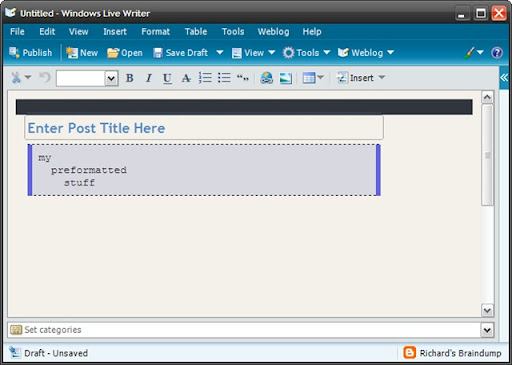
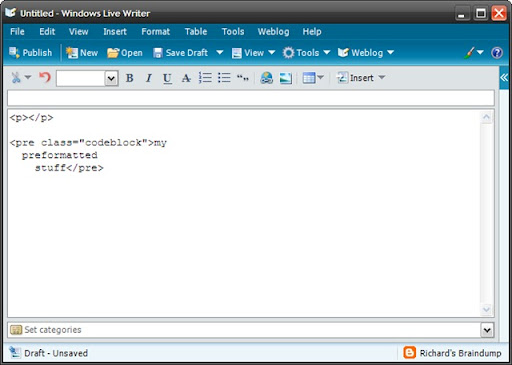
I was just entering some code sample in a blog entry via Windows Live Writer when it removed the line breaks from all my preformatted code sections (ie the <pre> sections).

Here's some screen shots of the bug in action:

1. Entering the <pre> code:

wlwb3_bug1

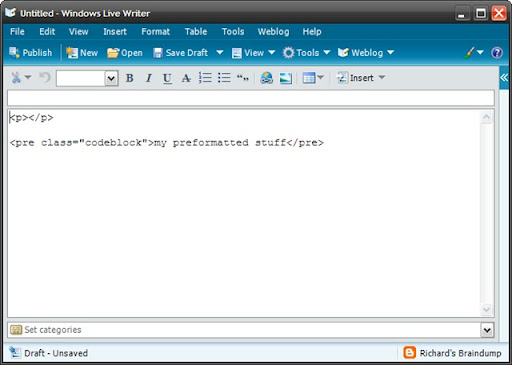
2. Switching back to Web view (F11)

wlwb3_bug2

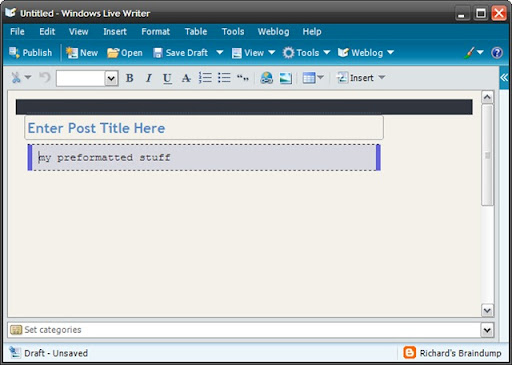
3. Switching back to HTML view (Shift+F11).  Nothing else was pressed.  You can see the <pre /> section is now messed up.

wlwb3_bug3

4. And back to Web view just to make sure it's been butchered (F11 again)

wlwb3_bug4

A quick look on google doesn't show anything about it.  Guess I'll go submit a bug report.

Sep 6, 2007

Live Writer Beta 3 is Now Available (plus more)

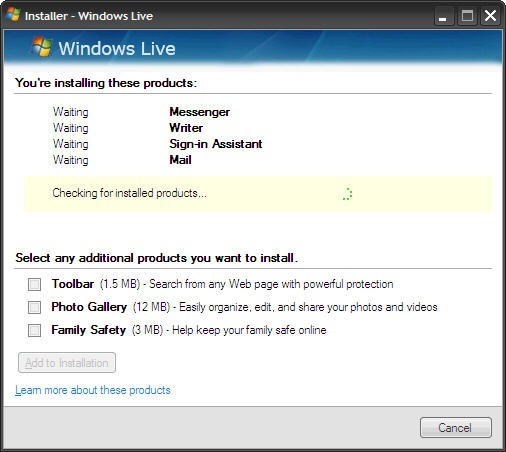
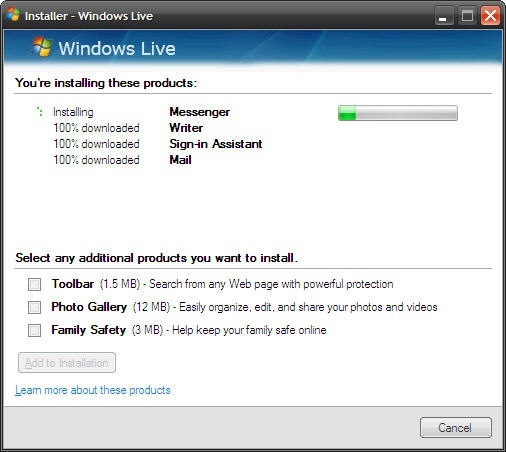
You can get more information and the download link from the Live Writer Blog post. You should know that the install does take quite a while to run through, and it installs new betas for other Live products you have installed.

The main new feature for Beta 3 is the ability to include images for blogger posts using Picasaweb. Below are screen shots of the install process and the updated live writer.

liveinstall liveinstall2

lwbeta3

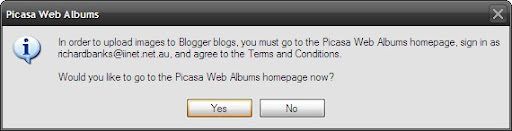
P.S. If you've not used Picasaweb before you'll be prompted with the following when you try uploading images for the first time:

lwbeta3 - picasaweb

Just follow the prompts and everything will appear. If you've ever uploaded images to your blog via blogger before they will appear in your picasaweb album as well.

Sep 1, 2007

IE's Guillotine Bug and Cut Images

My last post included a picture of a clock which I wanted on the right of the text so naturally I used a css inline style to float the image to the right.  The HTML is pretty simple

<IMG style="FLOAT: right" alt="clock" src="http://static.flickr.com/1115/1284040636_308c3d584d.jpg" border="0" />

Nothing too dramatic about that. OK, yes, so the inline style would upset the purists, but still... it's just an IMG tag right?  What can go wrong? Well, apparently a lot. Here's how the image appeared when I viewed the blog post in Internet Explorer 7:


 guillotine in IE7


What!  The image is chopped off!!  And yet space for the image is still there and the tool tips work when hovering over the image space as well. It's like it's floating, but partially hidden.   So I checked how it looked in Firefox


 guillotine in ffox


Hmm.  It's working there OK.  Maybe it's an IE7 problem.  So I had a look at the post using Google Reader (In IE7):


 guillotine in IE7 reader


 Well, that's just strange.  It appears OK in Reader using IE7 but not in the blog?  What's going on here?


Well, a quick search on Google turned up a problem I'd never heard of.  The "guillotine bug" for IE.  This is a rendering bug in IE that occurs based on certain rather weird conditions.  Check out the information on positioniseverything and css-class for more details.  The css-class article also includes 6 live examples of the bug at work. It's really a very interesting read and yet at the same time it's a really sad indictment on the IE team that it even exists.


Unfortunately the one useful fix that's mentioned is to add a "clear:both" to a <div/> following from the HTML block that has the problem and my blogger template already has this in place.  That means there must be something else going on.


A bit more searching later turned up this forum entry at incutio.


After skimming through the rather bizarre browser workarounds being talked about I saw something about IE working when there is a position: relative css property.


Well, that's a pretty easy thing to try.  So I changed the IMG tag to

<IMG style="FLOAT: right; position: relative;" alt="clock" src="http://static.flickr.com/1115/1284040636_308c3d584d.jpg" border="0" />

 And, lo! And behold! Floating images that don't get chopped in IE7 (and that still work in Firefox).


You know, sometimes, I just hate IE.  Grrrr.

Aug 23, 2007

Social networking links

I've resisted adding the social networking links to my site in the past because I don't want each post to look like a billboard for other sites. (Yes, I've got a little bit of google advertising going on, but that's just to pay for my lotro habit and it doesn't exactly pay the bills).

Recently I'm starting to find these things useful so I've added a few easy links to add my posts to the social networking site of your choice. Personally I'm now using stumbleupon, but because of the popularity of Digg and Facebook I've added those as well.

Hopefully this won't detract too much from the overall experience of the site, but if it does, let me know and I'll get rid of them in a flash.

Jul 11, 2007

Google's Code Prettifier

Well, this is kinda cool :-). Google has released the Code Prettifier - a little bit of javascript and css to turn unformatted code into something nice:

For example

void Main()
{
Console.WriteLine("Hello Blog!!");
}


Can become

void Main()
{
Console.WriteLine("Hello Blog!!");
}

With just the following tags around the code <pre class="prettyprint">...</pre> or <code class="prettyprint">...</code>

Thanks Google!

P.S. Looks like I need to work on the colour schemes. Ah well, nothing's perfect I suppose.

P.P.S It doesn't appear to handle <br /> tags properly at the moment which causes problems in blogger posts.

May 17, 2007

You Could be Reading This on a Wii

Well, you could if you used the new Wii interface for the Google Reader. It's _very_ experimental, but if you want to give it a shot go to reader.google.com and try it out.

Alternatively have a look at the blog entry which has a video of it in action.

Jan 23, 2007

Snap Links

You may have noticed that external links on this blog now have a "preview" window attached to them (thanks to Snap!) so you can get an idea of what the page is like that a link will take you to.

Hopefully you like it and find it useful. If you don't you can always turn the feature off by clicking the options link in the popup window and disabling it for this site (or all sites).

Nov 15, 2006

SiteMeter and MyBlogLog Comparison - Part II

Continued from Part I


So what does SiteMeter offer in comparison to MyBlogLog?

SiteMeter Logo

Sitemeter has a lot more reporting options than those offered by MyBlogLog.  It's supported through the advertising shown on it's stats pages whereas mybloglog seems to rely more on people paying for the "pro" version.

Sitemeter is a pretty ugly thing to look at, especially compared to mybloglog, but when it's the information that's important the looks can be forgiven.

5. SiteMeter: Usage Summary

SiteMeter Summary

The SiteMeter summary page is more useful than the MyBlogLog summary.  You see readers and page views just like MyBlogLog, but in addition you also see how long people were on the site on average, and a weekly view of what's been going on.

The only thing not on the summary is the number of exit clicks, though that information is available elsewhere.

6. SiteMeter: Usage Details

This is where sitemeter really takes off.  There are a plethora of options to provide different ways of seeing the details of what's been going on for your site.  You can see where people came from, what they clicked on to leave, what pages they entered the site on and what pages were the last they viewed, and who is currently on the site.

SiteMeter Who's On

The out clicks details is a little different to mybloglogs and probably not quite as useful.  Instead of just seeing the outclicks, you also see information on those who either closed their browser window or went to a different site by changing the URL in a different manner (i.e. bookmarks, manually entering it, etc).

SiteMeter Out Clicks

The blanks are really quite annoying and make this information hard to trawl through, and there' s no summary of this information.

7: SiteMeter: Data Over Time

SiteMeter does really well in this area.  it's got charting for one thing!

SiteMeter Visits  SiteMeter Page Views

The charts are available for daily, weekly, monthly and yearly aggregation and show your web site trending and usage patterns.  The spikes you can see in my charts relate to when other (more popular) blogs have linked to posts on this one.

But it's not just page hits that you can chart - your can also do navigation charting to show visit depth, daily durations, etc.  You can see geographically where hits are coming from, what languages, operating systems, monitor settings, etc are being used.  All of which are useful pieces of information and all things which mybloglog lacks.

Summary

MyBlogLog meets it's goals of tracking the thing most other logging mechanisms miss - the out clicks on your site and does it in a much nicer way than sitemeter does.  Plus it looks a whole lot nicer than SiteMeter as well.

Unfortunately, most people use blog stats for a whole lot more than just tracking why people leave.  If they confine themselves to just the niche of tracking outgoing links, they'll probably disappear.  I for one want a blog stats service that offers it all - a one stop shop.  Why should I have two different pieces of JavaScript on my page to track stats.  Especially when sitemeter does a pretty good job at it now.

MyBlogLog has a lot of potential, but wether they have the appetite to meet that potential is yet to be seen.  There's a whole bunch of things they could add that would be really cool - like day-to-day comparisons, any kind of charting at all (top referrers, weekly usage, etc), browser stats or location information, time zone, common navigation paths, and so on.

MyBlogLog is no doubt capturing the data required - they just need to think about ways to turn the data into information that is valuable to their users - then they might really have something.  But for now, mybloglog operates in a niche and one that is likely to get filled by other services that offer so much more than they do.

SiteMeter will remain as my main source of stats tracking, and while I'll keep mybloglog tracking going for now because the outlink tracking is interesting, it probably won't last.

SiteMeter and MyBlogLog Comparison - Part I

A few days have passed now since I started using the MyBlogLog stats tracking system. Here's my impressions on it and a comparison of it to SiteMeter - the system I use normally.

Overview

Both systems rely on the inclusion of a small bit of JavaScript code in your blog template to track visitors - where they came from and where they go to. The idea being to help you figure out what people read on your site, where they were referred from and what they click on when they leave. If you look at the information you should be able to see what your readers find interesting and (if desired) focus your posts a little better to improve your blogs relevance to your reader profile.

Personally, I use it because I find it interesting to see what links you follow to get here and what sort of posts you are reading, and then to see where it is your going to. I don't adjust my posting subject matter to suit, and in fact one of the more surprising things is that a number of people have come here looking for information about the Upside Down show - a weird and crazy toddlers education show made by the witty & hilarious Umbilical Brothers.

OK. So on to what MyBlogLog offers.

MyBlogLog Logo

1. MyBlogLog: Usage Summary

MyBlogLog Summary

As you can see a small snapshot of my blog (in case for some reason I forgot what it looked like!) and I can see how many readers hit my site, how many page views there were and how many people clicked away from the site. The data is for the last day only, and the pro version is meant to do live updating of the stats.

Kinda useful, and presented nicely.

2. MyBlogLog: Usage Details

MyBlogLog Details

This shows a top 10 for each category for the day. Where people came from, what they looked at, and where they went. Obviously we can only track what the clicked on to leave the site - if someone types a new address in the browser or closes the window then that's not tracked.

This is also kind of nice - especially the side by side comparison.

For instance I most people came from an infoq post, some from Google and so forth.

3. MyBlogLog: Data over Time

Summarising data is done via reporting as shown here - either summary reports, or detailed reports.

mybloglog report

mybloglog report

While this information is OK, there's little value in it. Compared with what you can see on sitemeter it's sadly lacking. There's no charting, no comparisons, no weekly or monthly views, no trending, etc.

And while tracking the outlinks is OK, it would have been much better if I could drill down to see what posts the clicks came from. For example, I've posted about Windows Live Writer on a number of occasions - so which posts are generating the clicks and which ones are being ignored?

4. MyBlogLog: Click Tagging and WidgetsMyBlogLog Widgets

Click Tagging

This one is technically really cool and I've seen it in action on other sites. Basically you turn on click tagging and when you mouse over a link the reader can see how popular that link is in comparison to the rest of the site.

While this is a cool feature, I think most readers would find it annoying after time. After all do you really care how popular a link is on a blog you read (like this one for example). I care, but I don't need click tagging to tell me - I can check it out in the stats.

As you would expect widgets are also available. The "top 5 outgoing links" widget is OK but once again it's something that's really only useful only to the blog author, otherwise it's just a way of encouraging people to click away from your site. The "recent readers" widget is nice, but you only see people who are mybloglog users and that's not a very high percentage of the Internet population now is it?

Continue to Part II

Nov 12, 2006

More on Trackbacks

Well, the standalone trackback tool I posted about yesterday seems OK, and since then I've also found SimpleTracks and HaloScan.

Unfortunately, it seems that many of the trackback systems reject "trackback pings" if they don't come from the site the blog is on due to spamming. This is a bit of a shame since I can't create a trackback link from within blogger itself, and the feature wasn't added to the beta either (which is also a bit sad).

HaloScan also enables trackback functionality for your blogger blog. I won't try out the trackback functionality for now as I don't want to be a spam target myself. There's enough stupid comments that I have to moderate already and I don't want to make things worse :-)

Nov 11, 2006

MyBlogLog and TrackBacks

I recently ran across MyBlogLog (at InstaBloke) where it was tagging outgoing links and ranking them in terms of popularity. I thought to myself "That's kinda useful" so I've whacked it on this site (without link tagging for the moment) to see how well it tracks things. Since I normally use SiteMeter I'm interested to see what the difference will be.

While I'm going on about "useful" things. I also found a nice web page that does trackbacks since blogger doesn't support it. Thanks to Ohad for the link.

Oct 5, 2006

How to Create Passionate Users

I've always thought that the "Head First" series of books were great.  Head First Design Patterns in particular in an excellent book and really makes a lot of sense.

Well I recently discovered that the authors have a blog called Creating Passionate Users.  It's all about making what you do more focused on the person using your products than on those making the products.  In other words it's more about you than it is about me.

Sure, the posts are on obvious subjects like thinking about your users, but if you're anything like me, the day-to-day of working in a company has a habit of getting in the way and you find your focus drifting to the internal company issues rather than staying on finding new and better ways to solve the issues that you're users/customers have.

The good thing about the way these posts are written is that they're not condescending or insulting to your intelligence.

If you've got any interest at all in the people who use your products then I'd strongly recommend having a look at this blog.

Oct 4, 2006

Community Server in Product Development

Running agile development teams is great but one of the things that can happen with agile is that information gets into a few peoples heads and often stays there until needed.  If those people leave or too much time elapses before it's recalled then the information is often lost.  Similarly other people new to the team have to try and extract information somehow from the existing staff and that can take time, and people in one team often miss out on the lessons learned in another.

So to try and help the teams communicate better I installed MoinMoin wiki and Community Server.

After having both of these platforms up and running for a short while now it's really interesting to see what's happening.

The blogging in Community Server has been a big hit with regular posts being made each day. Interestingly enough it's mainly the developers who have been blogging.  The BA's and most testers have been really quiet.

The developers are blogging about coding practices, interesting things they find on the web and really sharing a lot of information.  It's very cool seeing the team looking out for each other and trying to share as much of their knowledge as they can.

The wiki has also been used a bit, but for more of the semi-static information.  Things that are popping up there are how-to's, basic guides to various processes, social stuff (like party photos), and other bits and pieces.

The forums provided by community server are still pretty much unused, but that may just be because people aren't yet sure how to make use of them properly for internal communications.

P.S. To help encourage adoption one of the things I've tried to make sure of is that I am leading the way and be an example.  I'm blogging about everything I can think of, ideas I have, what's happening in the rest of the business, etc. and I'm also adding content into the wiki and trying to post questions to the forums.  I'm even putting notices there and then mass-emailing people that they should look on the blog to try and get the late-adopters into it.

Oct 1, 2006

Team Communication

I've been on a communications kick recently, looking for ways to help improve my teams communication.

The team communicates well currently, but it's all verbal, email or IM communications. How do we retain knowledge, how to we make information searchable, and how do we get the information we need when we need it without flooding each other with communications spam. You know, the type of email that is cc'ed to every man, woman and child on the face of the planet just in case we think someone might want to know something.

I don't know about you, but this sort of communication gets a bit overwhelming and turns into just so much background noise. Emails get ignored, deleted unread or filed in the "action required" folder and then never see the light of day again.

For instant one-to-one communications we can walk over to someone and talk, or use the phone (no really!, it's true), or we can use skype or messenger. Any of these are viable options and work well and are currently used by the team. Of course nothing that transpires in these conversations is recorded or kept for historical purposes, but that's fine.

Then there's the delayed form of one-to-one communications we all know and love - email. Obviously email can also used for the one-to-many form of communications as well. Internally we log all the emails for security purposes, but we don't make them publicly searchable or retrievable for privacy reasons. Obviously this means that any knowledge transfer that occurs in email occurs with the participants of the email conversation alone and that's kind of OK but doesn't lead to long term knowledge retention for the team.

We also have file shares - the usual suspects where we store documents, specifications, user guides, use cases, design ideas, project documents and a whole bunch of other rubbish we just don't know what to do with. This is OK for knowledge retention and is most organisations one and only form of semi-permanent knowledge that isn't residing in the heads of their employees. The problem with this is that the knowledge is disorganised - sure people put documents in folders like \\server\share\myprojects\project1\March\2006\specs, but there's all sorts of problems with this. What happens if I can't remember when I did something? What happens if someone else organises their folder structure by subject matter instead of project? What happens when the person who put something in those folders leaves? Who really knows what information is walking out the door between that persons ears, where they kept things and how often they updated their information (if ever), and if we don't know what they did or didn't know then how would we ever know to look for it and where would we find it. Intranet search engines like the Google mini or nutch (which uses the lucene search engine) can really help in this matter, but your mileage may vary and you are dependant on permissions to folders being appropriate.

So we've got a few bases covered, but we're still missing a few pieces to the puzzle.

How do we do non-directed, non-real time communications?

How do we do non-structured information storage (especially for specs, etc)?

Wiki's answer the second question. And Blogging answers the first.

Wiki's help with non-structured storage for the team. Why? Because they are HTML based. You can write a spec, like a use case for instance, and link to actor definitions, other use cases, tech specs, or whatever else, all without caring about where exactly the pages for those other items live. In a file share system you need to put a reference to other documents in the main document, and hope that none of those other documents ever gets moved.

Wiki's also help with information currency. When something changes, it's easy to find the information in the Wiki (just search) and then edit and change it. File share based information is a lot harder to do because finding the information in the first place is difficult and that alone prevents most people keeping information current. The barrier is too high.

Wiki's like MoinMoin also feature historical tracking and a diff tool. Someone changes something, then you can not only see who changed it, but what the change was. When updating software to match and updated design, this is a boon. Trying to do it with file shares pretty much means relying on the "track changes" feature in MS-Word, and people will forget to turn that on, or will merge the changes before someone else can see them.

Blogs help with the non-directed communication for the team. I don't think I need to explain the benefits of blogging and there are enough other articles on the web for that. I had a bit of a look around for decent team blogging systems and saw things from the main blogging people but none of them really seemed to work well for team blogging - where each member of the team gets their own blog and can so what they like within that space. Then I ran across Community Server. What a pleasant surprise that was.

Community Server features include blogging and personalisation, but they also include forums. Now I have a mechanism for not only supporting the non-directed communications and keeping the information searchable and retrievable, but also keeping the "how do I" type of questions in an area where others can search for and find information much later (which I can't do with email).

I put community server into the team last week, and the initial take up has been positive. Like all things though, the hard part is now encouraging those that don't naturally put their knowledge down on keyboard, to start doing so.

By the way, in case you're wondering, do I think this solves all of the communications issues, or the knowledge retention or search problems I have? Not likely, but it's a few more tools to help and enable communications and in agile environments communication and openness are a few of the keys to success.