Showing posts with label workflow. Show all posts

Dec 11, 2007

Workflow Foundation Presentation

For those who attended the RDN Presentations today, thanks for coming! It was great to see you and fun to be able to talk with you about Workflow Foundation. The slides from the presentation will be available shortly on the RDN calendar page of the Readify web site.

Update (22-Dec): The slides are now available from the RDN Downloads page.

Oct 4, 2007

Using Workflow Rules to Iterate and Remove Items From a Collection

I got asked recently if it was possible to use the Workflow Rules engine to remove items from a collection.

It turns out that it's actually quite easy to do, as long as you understand how the rules engine works, and how to iterate over collections.  So before I show you how to remove items from a collection, let's run through how you can use a rule set to iterate through a collection.

Oh, before we go any further, this blog post is based on the "RulesWithCollectionSample" that you can get from the netfx3 site.

So if you haven't already done so, go to the site, download the sample and make sure everything compiles and runs properly. P.S. make sure you have the ExternalRuleSetToolkit sample from the site as well since the RulesWithCollections.rules file that comes with the sample need to be imported into the database using the ExternalRuleSetToolkit.

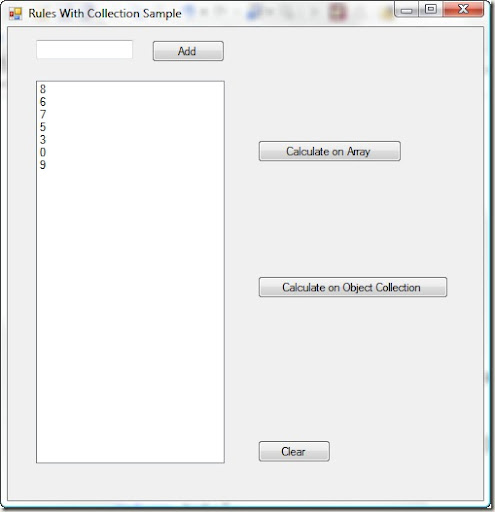
What you should see when you run the sample is a screen that looks like the following:
image

When you click on the "Calculate on Object Collection" the workflow rules engine is invoked, calculates the sum of the individual items in the collection and displays the result next to the button.

The question is how?

Understanding Rule Chaining

The key to this sample is an understanding of how the rules engine works.  The rules engine is a forward chaining rules engine, which in simple terms means that if a rule relies on a property in it's evaluation and a subsequent rule changes the value of that property then the rule will be reevaluated as well as any subsequent rules in the chain.

What this means is that if we have 2 rules defined as follows:

1) if Customer.Priority = 2 then CallCentre.StaffType="Manager" else CallCentre.StaffType="Normal"

2) if Customer.Name = "Special Customer" then Customer.Priority=2

And if the customer in question is a "Special Customer" with a priority of 0 then what will happen is the following:

i) The Condition clause for Rule 1 will get evaluated.  Because Customer.Priority is part of the condition (ie the rule depends on that value) then the Customer.Priority property will be tracked by the rules engine.  Conversely, the CallCentre.StaffType is not part of the rule condition and is therefore not tracked by the rules engine.

ii) Because the customer has a priority of 0 the CallCentre,StaffType is assigned to "Normal".

iii) Rule 2 is evaluated and since the Customer.Name matches the condition the Customer.Priority value is changed to 2.

iv) Here's where the magic happens.  The rules engine detects that the Customer.Priority value has changed and that Rule 1 (which is higher in the rule chain) depended on that value in it's evaluation.  The rules engine stops processing any further rules, goes back to Rule 1 and re-executes it, resulting in the CallCentre.StaffType value being changed to "Manager".

And before you ask, yes - it's entirely possible to set up an infinite loop in your rules when chaining is being used.

For this reason and because you don't always want the chaining to happen it is possible to change the default chaining behavior of a rule set.

Iterating Collections

OK, now to the sample code.

As shown above the sample has a list of numbers in the list box.  When you click on the "Calculate On Object Collection" button an Order object is created that contains a collection of OrderItem objects.  Each OrderItem in the collection has a price based on the corresponding list entry.

The workflow rules engine is then invoked on the Order object using the OrderRuleSet which in turn iterates over the elements in the collection and calculate the sum of the OrderItems giving a total order value.

Now, unless you were particularly into self-harm this is not something you would normally do via the rules engine but it does show you the principle involved in collection iteration.

Let's have a look at the ruleset.  You should see that there are 4 rules all at different priority levels.  The first rule to be executed is the one with the highest priority (larger numbers are higher priorities) - the Initialize rule.

The Initialize rule merely obtains the enumerator for the OrderItems collection and assigns it to the Order.enumerator property.

Rule: Initialize


Condition: 1 == 1


Then: this.enumerator = this.OrderItems.GetEnumerator()
System.Console.WriteLine("Initializing")


Else: ---


What's with that 1 == 1 business?  Well, all it does is force the Condition to evaluate to tru.  My personal preference if you want to use something to always evaluate to true is to use "true".  Using 1 == 1 just feels wierd.


The next rule, IteratorOverItems, performs a MoveNext using the iterator we obtained in the inialise shed.  MoveNext will return true until it reaches the end of the collection.

Rule: IteratorOverItems


Condition: this.enumerator.MoveNext()


Then: this.CurrentItem = (RulesWithCollectionSample.OrderItem)this.enumerator.Current
System.Console.WriteLine("Assignedenumerator" + this.OrderItems[0].Price)


Else: System.Console.WriteLine("we are all done")


If MoveNext didn't fall off the end of the collection, we take the current item from the iterator and assign it to the Order.CurrentItem property.  We could reference the value from enumerator.Current in later stages, but by placing the value in a specific property we make it easier for the rules engine to know when the value changes.


The next rule is the IndividualItem rule

Rule: IndividualItem


Condition: this.CurrentItem != null


Then: this.Total = this.Total + this.CurrentItem.Price * this.CurrentItem.Quantity
System.Console.WriteLine("Running Total: " + this.Total.ToString())


Else: System.Console.WriteLine("current item is null")


So, we check if the Current OrderItem the iterator gave us still references a real, live, breathing object and if it does we add the OrderItem total cost onto the Order object's Total.


So, that's it.  3 simple rules and we're done.


Well not quite.  If we ran this rule set now, we would only ever get the total using the first OrderItem in the collection.


We need some way to cause the enumerator.MoveNext() method to get reevaluated so we can get the next OrderItem from the collection, but the only way a rule gets re-evaluated is when the objects used in the Condition change.  We don't want to change the iterator itself, we just want to call MoveNext() again.


Explicit Chaining


This is where the final rule kicks in.

Rule: FInished


Condition: this.CurrentItem == this.CurrentItem


Then: System.Console.WriteLine("Finished True")
Update("this/enumerator")


Else: System.Console.WriteLine("Finished False")
Update("this/enumerator")


First up we check this.CurrentItem against itself.  It should always return True, so the Then action in the rule will get evaluated.


In here you'll notice the use of the Update method.


The Update method is part of the rules engine and tells the engine that a property (or properties) has been changed and any rules that depend on that property should be re-evaluated.  You don't actually have to change the value of the property itself, you're just telling the rules engine to act as if the value changed.


The IteratorOverItems rule uses the this.enumerator property in it's condition.  Updating the enumerator will cause the rule to be reevaluated, causing MoveNext() to be called, which in turn updates the CurrentItem property, causing the IndividualItem property to be reevaluated and thus incrementing the Order.Total property to give us our total.


After seeing this there's a few questions you might ask:


What's up with that weird slash notation in the Update statement? Think of it like a path to a property.  In this case there is only one property, but the Update statement allows you to mark multiple properties as updated using wildcards. e.g Update("this/*").  If you want to use dot notation that's fine as well.  Just use Update(this.enumerator) - no quotes.


Why does the Condition use this.CurrentItem and not just use True?  Simple.  Once a rule is evaluated it is marked as done.  It will only ever get reevaluated if the properties in it's condition clause are updated.  The value "True" is a constant so the rule would never get re-evaluated.  By using this.CurrentItem, every time the current item changes this rule gets evaluated again.


So, now we have a pattern to how to iterate collections:


1. Get the enumerator


2. Use MoveNext and get the Current element of the collection


3. Do something with that current item (ie your business rules, etc).  Make sure the Current Item is used in the Condition so the the rule is reevaluated for each item


4. Call Update() on the enumerator to force re-evaluation of the IteratorOverItems rule and ensure that this rule uses CurrentItem in the condition.


Deleting Items In A Collection


Phew! Now that we know how to iterate over a collection how about we try and delete something from it.  Let's try removing every OrderItem with a price greater than 20?


It's pretty much the same as iterating the collection, but the thing to watch for is that when you delete an element from a collection you invalidate the enumerator and have to get a fresh one.  We'll need some way to force the enumerator to get refreshed.

Rule: Initialise (priority 2)


Condition: this.ID == this.ID


Then: this.enumerator = this.OrderItems.GetEnumerator()
System.Console.WriteLine("Got the enumerator")


Else: System.Console.WriteLine("Didnt get the enumerator")


Note the difference here.  The condition is no longer 1 == 1 (or True).  Why, because we're going to Update() the ID property after we delete an element to force the rule to re-evaluate, in turn refreshing our enumerator.

Rule: Iterate (priority 1)


Condition: this.enumerator.MoveNext()


Then: this.CurrentItem = (RulesWithCollectionSample.OrderItem)this.enumerator.Current
System.Console.WriteLine("Got an item")


Else: System.Console.WriteLine("No more items")


This is the same as the previous Iterate rule.  Nothing different at all

Rule: IndividualItem (Priority 0)


Condition: this.CurrentItem != null && this.CurrentItem.Price > 20


Then: System.Console.WriteLine("Got an item over 20")
System.Console.WriteLine("About to remove an item")
this.OrderItems.Remove(this.CurrentItem)
Update("this/ID")


Else: System.Console.WriteLine("Got an item under 20")
Update("this/enumerator")


Ok, here's where the action is.  In the Condition we check the CurrentItem for null and then check it's price.  If the item is null or the price is under 21 then we'll execute the Else actions.

The Else action just calls Update() on the enumerator - just like in the collection iteration ruleset above.

But what happens when the price is over 20?

First we remove the item from the collection using the normal .NET Remove method.

We then mark the ID field of the Order object as updated using the Update() statement.  This causes the Initialise rule to get reevaluated, which results in restarting our collection processing all over again.

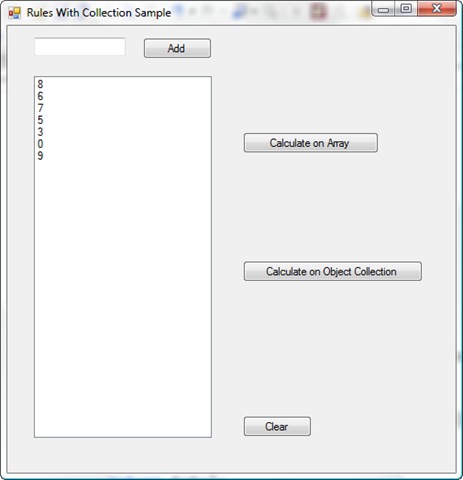
If we were to just Update() the enumerator using Update(this.enumerator) instead, we would get a run time error when MoveNext() is called since the collection has been changed.  Forcing the Initialise rule to get reprocessed ensures that we get a fresh enumerator for the collection and avoids the run time errors.
Aug 27, 2007

How To Use the Windows Workflow Rules Engine By Itself

Windows Workflow Foundation (WF) is a great technology for adding workflow functionality to any .NET application and it includes within it a very useful forward chaining rules engine. Because the rules engine is part of WF there is an unfortunate presumption that in order to use the rules you need to be running a workflow; but who wants to do that just to run a few rules across their objects? Especially when instantiating a workflow requires quite a bit of work or using a workflow just doesn't make sense.
Well, as it turns out you can use the workflow rules engine on it's own without any workflows at all. Because the windows workflow foundation architecture is very loosely coupled the workflow rules engine is effectively a standalone component that workflows call out to when they have rules to evaluate. We can take advantage of this from our own .NET applications and call the rules engine whenever we want a set of rules evaluated against one of our objects.
Why would we even want to do this?
  1. Flexibility.
    Why hard code business rules into your application? Every time a rules changes you need to recompile and redeploy your code. Wouldn't it be great to have all these rules available as configuration data so that all that is required to change something is to edit the rule definitions - no recompilation and no redeployment.
  2. Ownership.When rules have to be hard coded into the application they become the property of the developers. If the rules exist as configuration data and can be modified by business people then the rules can be owned and managed by those same people, not the developers.
  3. Transparency.What happens when a rule isn't defined correctly or information isn't processed as expected? Normally a developer has to jump into the debugger, step through the code, find the right part of the code and check what's going on. Externalizing the rules makes it easy for non-developers to examine the rules are and see where the problem is occurring.
  4. Power.
    It's easy enough to represent simple rules in code using if-then-else syntax, but if you've ever tried working through rule priorities or forward-chaining of rules (where one rule down the chain means a previously evaluated rule needs to be re-processed) then you know it's not an easy thing to do. The maintenance headache it represents can be daunting. By using a rules engine it becomes much easier to represent collections of rules that would be very difficult to implement in code.
O.K. so if you're still with me then you're probably wanting to know how it all works.

Step 1: Create A Way to Enter Rules

To start with, we need some way to enter rules and somewhere to store them. And, like all good developers, we don't want to reinvent the wheel. Go to the MSDN web site; specifically the rules engine code sample and once there download and install the ExternalRuleSetDemo sample.
The demo shows you how to create and edit sets of rules and store them in a database. Normally the rules editor is only available from within Visual Studio as part of the workflow editor but the ExternalRuleSetDemo shows how you can host the RuleSet Editor in a standard windows application and provide a backing store for the rules using an SqlExpress database.
The solution in the sample kit contains 4 projects but you really only need to look at the ExternalRuleSetLibrary project and the RuleSetTool project.
By the way, you don't have to use SqlExpress as the backing store. It's a fairly trivial process to switch it to another provider. Just go to the SaveToDB() and GetRuleSets() methods in RuleSetEditor.cs and change the code. For fun, I switched to an SqlCe Database with very little effort.
Once you've compiled the application, run it and you should see something like this (but without any Rule Sets)
wfrules1
To create a rule set, click the New button. A new ruleset will be created with some default information. You can then indicate what class to base your rules on by clicking the browse button, locating the assembly that contains the class and clicking OK.
Next you can click the Edit Rules button to start the standard WF rules editor window as shown here:
wfrules2
Now you just need to create the rules you need and you should be ready to move to the next step (don't forget to save your rules!). There is one thing to note; you can create rules using any of the properties and methods of the target class - i.e. public, internal and private properties and methods. If you will be calling the rules engine from an assembly different to the business class then you will need to restrict the yourself to the public properties and methods or you will get runtime access permission errors.

Step 2: Calling the Rules Engine

Ok, so now we have a way to create and edit rules. That's great, but pretty much useless unless we have an application in which to use those rules.
Thankfully, the task of talking to the rules engine is actually fairly simple. What we need to do is create a helper class that will:
  • Retrieve (and deserialize) the rules from the database.
  • Validate the rules against the class we want to run them against
  • Execute them against the object we choose.
And then we'll use that helper class to run the rules for our business object.
If you go to the samples site again you can download the RulesDrivenUI sample and have a look at the code in there. It's the basis for what's shown here.
Now, lets load up the rule set. We'll pass in a string containing the name of the rule set we want to load and then load it up from the database.
public void LoadRuleSet(string ruleSetName)
       {
           WorkflowMarkupSerializer serializer = new WorkflowMarkupSerializer();
           if (string.IsNullOrEmpty(ruleSetName))
               throw new Exception("Ruleset name cannot be null or empty.");
           if (!string.Equals(RuleSetName, ruleSetName))
           {
               _ruleSetName = ruleSetName;

               ruleSet = GetRuleSetFromDB(serializer);
               if (ruleSet == null)
               {
                   throw new Exception("RuleSet could not be loaded. Make sure the connection string and ruleset name are correct.");
               }
           }
       }

The WorkflowMarkupSerializer is used to deserialise the XML based workflow that we stored in the database (in step 1). P.S. These methods exist in a helper class, and the ruleSet variable is a private field of the RuleSet type.

GetRuleSetFromDB is shown below and once again it's pretty simple. The code show here uses the SqlCe database provider, just to prove it can be done. You can, of course, use any database mechanism you like.
private RuleSet GetRuleSetFromDB(WorkflowMarkupSerializer serializer)
       {
           if (string.IsNullOrEmpty(_connectionString))
               return null;
           SqlCeDataReader reader;
           SqlCeConnection sqlConn = null;
           try            {
               sqlConn = new SqlCeConnection(_connectionString);
               sqlConn.Open();
               SqlCeParameter p1 = new SqlCeParameter("@p1",_ruleSetName);
               string commandString = "SELECT * FROM RuleSet WHERE Name= @p1 ORDER BY ModifiedDate DESC";
               SqlCeCommand command = new SqlCeCommand(commandString, sqlConn);
               command.Parameters.Add(p1);
               reader = command.ExecuteReader();
           }
           catch (Exception e)
           {
               ...
           }
           RuleSet resultRuleSet = null;

           try            {
               reader.Read();
                resultRuleSet = DeserializeRuleSet(reader.GetString(3), serializer);
            }
           catch            {
               ...
           }
           sqlConn.Close();
           sqlConn.Dispose();
           return resultRuleSet;
       }

Note the call to DeserializeRuleSet() [in bold]. This is where the ruleset we retrieved from the database is converted from XML back to a ruleset object. It basically wraps a call to the WorkflowMarkupSerializer as shown:
StringReader stringReader = new StringReader(ruleSetXmlDefinition);
               XmlTextReader reader = new XmlTextReader(stringReader);
               return serializer.Deserialize(reader) as RuleSet;

Cool! So now we've got the rules loaded up from the database.

At this point we'd love to be able to just point the rules at an object of our choice and run them, but before we do, we have to check that the rules are still valid. Why? Because when we deserialised the rules from the database we had no guarantee that those rules were still valid for the object we are going to run them against. Method signatures may have changed, properties may have been removed or we may have loaded up rules created for a completely different class. By validating the rules we protect ourselves from (most) run time errors.

To do it we use the RuleValidation class. We also use the RuleExecution class to get an execution context:
private RuleExecution ValidateRuleSet(object targetObject)
       {
           RuleValidation ruleValidation;

            ruleValidation = new RuleValidation(_targetType, null);
            if (!ruleSet.Validate(ruleValidation))
           {
               string errors = "";
               foreach (ValidationError validationError in ruleValidation.Errors)
                   errors = errors + validationError.ErrorText + "\n";
               Debug.WriteLine("Validation Errors \n" + errors);
               return null;
           }
           else            {
                return new RuleExecution(ruleValidation, targetObject);
            }
       }

There are 2 important things happening here. Firstly we are validating the rules by passing in the type of the object we are going to run them against and checking if there are any errors. Then secondly we are creating an instance of the RuleExecution class. This is needed to store the state information used by the rule engine when validating rules. Note that while we are passing in the validated rules and the object we want to execute the rules on at this point we have not yet executed the rules, we have just created the context in which they will run.

So now we come to it. Finally! It's a really simple call to the RuleSet Execute method:
private void ExecuteRule(RuleExecution ruleExecution)
       {
           if (null != ruleExecution)
           {
               ruleSet.Execute(ruleExecution);
           }
           else            {
               throw new Exception("RuleExecution is null.");
           }
       }

We can now wrap all these methods up into a simple method as follows:
public void ExecuteRuleSet(object targetObject)
       {
           if (ruleSet != null)
           {
               RuleExecution ruleExecution;
               ruleExecution = ValidateRuleSet(targetObject);
               ExecuteRule(ruleExecution);
           }
       }


Now to run rules for our class all we need to do is make two simple calls. Assuming we have put the above code in a helper class then we can do something like this:
WorkflowRulesHelper wfhelper = new WorkflowRulesHelper();
           wfhelper.LoadRuleSet("LSCRules");
           wfhelper.ExecuteRuleSet(this);

Now all we need to run rules in our classes is these few lines of code.

Pretty cool, hey? If you've got any comments I'd love to hear them :-)

Aug 10, 2007

Tech.Ed 2007: Workflow Rules

Matt Winkler just gave a great talk on using and extending Windows Workflow Rules.  In the session he talked about the different options for accessing the rules engine including the very interesting revelation that you can use the rules engine without using a workflow.

In other words you can use the rules engine in your normal .NET applications and get the rules to work on normal .NET objects.  You're not just restricted to running rules from within workflows!  It's very, very cool and opens up a whole lot of possibilities and options for developing your .NET apps.

Matt also ran through the use of rules in activity conditions, policy activities and custom activities; how to use attributes on methods to tell the rules engine how to behave; he showed a number of different custom rule editors; how to write your own rule editor (including changing the semantics so that your users can use domain specific languages, etc) and finally threw the floor open to questions.

Some interesting things that came out of the session - the WF team tested the rule engine with over 100,000 rules in a single ruleset, including rule chaining.  Some people have real world rule sets with a few thousand rules.  A rule set is evaluated in a single thread meaning performance will be directly linked to the number of rules in a ruleset.

What's the biggest problem with the WF Rule Engine? The lack of debugging support - if you've got lots of chained rules it's really hard to get a handle on where things might be going wrong.  Tools like the Ruleset Analyzer can help but it's obviously not as good as a debugger.

Jul 18, 2007

My First Real Foray into Windows Workflow

I've read a bit about Windows Workflow Foundation (WF) in the past, but I've never done real-world with it.  Recently I've been doing a bit of work helping a client get a proof of concept solution up and running for an SOA based forms workflow environment.

I've been using state based workflows, getting my head around the event handling model, the way the workflow interacts with the host (especially interesting when the host is ASP.NET web services  - and no, I'm not talking about workflows exposed as web services), developing custom activities for AD interactions and sending emails (via other web services) and all kinds of other interesting things like error handling and so forth.

I must say, my heads still spinning with all the new information I've been cramming into it.  WF is just so big & deep & flexible. I always thought it was a bit lightweight and only designed to help people with UI wizard-style forms, but it's oh so much more than that.  There's a whole world of possibilities that have opened up before my eyes :-)  I think I'll be getting into this a bit more over the coming months as it's very, very interesting stuff.